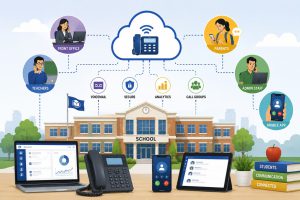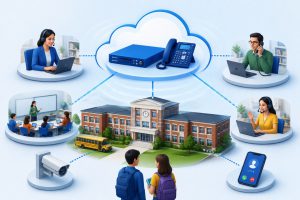

What happens when the front office needs to reach every classroom in minutes, but the phone tree breaks and calls bounce between desks? A PBX phone solution for schools helps districts tighten response, keep staff reachable, and protect daily communication when pressure hits. When every second counts, staff need one clear path to connect, not five different numbers and a hope that someone picks up.
It also reduces the daily friction that drains schools quietly, missed parent calls, long transfers, and messages that never reach the right person. Over time, that consistency builds calmer operations because teams know exactly how communication will work on normal days and high-stress moments.
Why Schools Are Transitioning to Modern PBX and VoIP Communication Systems
Schools treat communications like power and water. Staff expect it to work every time. Legacy landlines and aging PBX cabinets create friction. They limit changes, force refresh cycles, and turn moves and extension updates into vendor tickets.
Leaders want a system that supports safety routines, not only parent calls. Reports from U.S. school systems such as New York City describe plans to phase out legacy PBX and landlines and adopt cloud VoIP platforms to support communication for about 150,000 staff and about 900,000 students.
VoIP upgrades match school operations. District IT teams need centralized administration, role-based routing, call records, and the ability to keep lines active when staff work across buildings and schedules. It supports faster staffing changes across school semesters.
How PBX Phone Solutions Bring Comfort and Value to Educational Institutions
PBX phone solutions bring comfort and value because they make school communication predictable. Staff stop guessing who should answer, where calls should go, and how to reach the right department during busy hours. They also reduce missed calls and unnecessary transfers, so parents and vendors reach the right person faster, and the front office stays in control.
Faster Emergency Alerts and Campus-Wide Notifications with a PBX Phone Solution for Schools
Safety response starts with speed. A modern PBX lets districts build emergency call groups for security, nursing, counseling, and leadership. The system rings in a defined order, escalates on no-answer, and routes calls by role instead of personal lists.
That structure supports drills and onboarding. Staff follow one routine across campuses.
Reliable Communication Between Classrooms and Administrative Offices
Schools run on constant coordination. Teachers need quick support. Front offices manage attendance, health calls, visitor issues, and parent questions at the same time. A PBX phone solution for schools improves flow through clean extensions, shared directories, and routing rules that match coverage.
For example, the system can route nurse calls to the health office first, then route to a backup team during lunch. It can route transportation calls to a dispatch queue during dismissal. Callers reach the right team with fewer transfers.
Enhanced Safety with Direct Emergency Calling and Location Identification
Emergency calling must deliver accurate location data. Districts should map phones and softphone users to building addresses, wings, or room zones where the platform supports it. Responders need the right entrance, not a general campus label.
A strong design can keep a dedicated emergency line, add priority routing for certain extensions, and create code lines that notify security teams while the caller stays connected.
Seamless Integration with Access Control and Security Systems
Security teams manage access points, visitor procedures, and intercom traffic. A PBX phone solution for schools can support those workflows through integrations, routing logic, and priority lines. When the system routes entrance calls to a defined group, schools reduce missed visitor calls.
Districts can design escalations for high-risk events. A code call can ring security first, then leadership, and log the chain for review. Call recording can support training when districts use clear permissions.
Scalable Infrastructure for Growing School Campuses
Districts change every year. They add programs, move staff, open new wings, and shift grade bands. A modern hosted PBX scales through configuration and licensing, not new cabinets and line cards. IT teams can add extensions, create new departments, and update call menus from one admin view.
This model supports standardization. Districts can use templates for auto attendants, ring groups, and extension plans, then apply them across campuses.
Cost Efficiency Through Cloud-Based VoIP Technology with a PBX Phone Solution for Schools
District budgets demand predictable spending. Cloud VoIP reduces on-site PBX hardware costs and lowers the support burden tied to aging equipment. IT teams can handle moves, adds, and changes through admin tools instead of vendor tickets.
VoIP supports flexible devices. Schools can keep desk phones for fixed roles and use softphones for roaming staff. When districts plan to mix with intent, they cut duplicate lines and reduce side tools.
Squibit: Delivering Advanced PBX Phone Solutions for Schools
Districts need a platform that supports voice operations and daily oversight, not a basic dial tone replacement. At Squibit, we focus on call control, visibility, and faster workflows for teams that depend on calls every day. Squibit UC runs as a cloud-hosted communications platform with hosted PBX calling, routing, extensions, voicemail, and user management, plus tools that support modern school operations, making it a practical PBX phone solution for schools that need reliability without added admin load.
In education deployments, Squibit aligns the platform to campus workflows and safety routines:
- Business texting for parent updates, reminders, and confirmations inside the same platform
- Call recording and reporting for training, service review, and issue handling.
- CRM integration support so districts can link communication with existing systems
- AI-powered sentiment analysis to tag calls as positive, negative, or neutral for quality review
Squibit supports branded calling and access through desktop, browser, and mobile, so staff stay reachable across campuses and closures.
Key Considerations When Upgrading to a PBX Phone Solution
Treat the upgrade like an operations project. Start with call mapping. Document the calls that carry risk: emergencies, health office, attendance, transportation, and visitor management. Then design coverage for normal hours, lunch coverage, dismissal, and after-hours.
Next, validate network readiness. Voice needs stable connectivity, clean switching, and prioritization for voice traffic. Then decide device strategy. Assign desk phones to fixed roles and softphones to mobile roles. Add rules for emergency calling and location mapping.
When you compare vendors, we recommend you push for proof, not promises. Ask for a pilot plan, training by role, and a clear owner for post-go-live changes.
| Decision Area | What to Ask | Practical Target |
| Call flows | Who answers, who backs up | Ring groups with overflow and escalation |
| Emergency calling | How location data maps | Tested E911 behavior by building zone |
| Paging support | How alerts reach staff | Consistent routines by campus |
| Reporting | What leaders review | Missed calls, queue trends, recordings |
| Support model | Who makes changes | IT-controlled admin with vendor backup |
Conclusion
A strong school phone environment protects safety routines and keeps daily communication clean. Districts that design call flows, emergency behavior, and adoption with care improve response speed and reduce missed calls.
If you want a clear upgrade path, book a demo and see how a PBX phone solution for schools can support your campus plan, and we will map it to your real workflows.
FAQs
1) Can a district run one system across K-12 and adult education sites?
Yes. Use one admin view, then segment departments and menus by site.
2) What should IT ask about voice quality on school Wi-Fi?
Ask about roaming, packet loss handling, and call tests in gyms and hallways.
3) How do districts handle multilingual auto attendants and after-hours menus?
Use multiple menu trees and schedules. Route by language choice.
4) Can schools restrict outbound calling to prevent misuse from classroom phones?
Yes. Limit call destinations by extension, time, and role.
5) What is a practical timeline for a district-wide cutover?
Many districts phase by campus. Plan weeks for design, testing, training, and porting.
Also Read:
Data Privacy and Compliance in Hosted IP PBX Solutions for Schools