Most businesses already record some calls. Far fewer can say those recordings actually get used.
They lie in a folder, nobody has time to listen, and they only get opened when something goes wrong. The right PBX call recording software changes that. It turns recorded calls into something your team can search, review, and learn from.
This post walks through what to look for, which questions to ask before you commit, and which mistakes to avoid.
What Should PBX Call Recording Software Do for Your Team?
At a basic level, PBX call recording software captures conversations that happen on your business phone system and stores them in one central place. Good software goes further. It helps you understand what was said without forcing someone to listen to every call from start to finish.
Customer conversations hold a lot of useful information. They show how well your team serves customers, what concerns keep coming up, and where new business opportunities are hiding. Recording is only the first step. Reviewing and understanding those calls is where the value sits.
Start With Why You Are Recording Calls
Before you compare vendors, get clear on your purpose. Different goals call for different features.
Employee Training
Real calls are the best training material you have. New hires can hear how experienced teammates handle a frustrated customer or explain a tricky service.
Quality Assurance and Customer Service
Managers can check whether calls follow your standards and spot patterns across the team. This is far more reliable than relying on memory or occasional spot checks.
Compliance Support and Dispute Resolution
When a customer says “that’s not what I was told,” a recording settles the question quickly. It also gives you a record to support internal policies and compliance needs. (Always confirm your specific regulatory requirements with your legal team.)
Features That Matter When You Compare Options
Feature lists get long fast. These are the ones that make a daily difference.
Automatic and On-Demand Recording
Some calls should always be recorded, such as sales lines or support queues. Others only need recording when an employee chooses to start it. Look for software that supports both, so you are not stuck with all or nothing.
AI-Powered Transcription
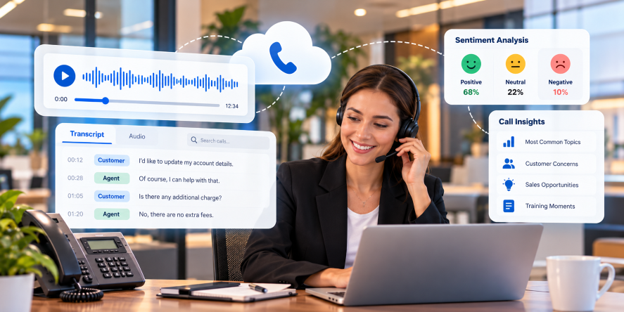
Transcription turns audio into text you can scan in seconds. Instead of replaying a ten-minute call to find one sentence, you search the written version and jump to the moment that matters. For busy managers, this alone can save hours every week.
Sentiment Analysis
This is where recordings become genuinely useful. AI-powered sentiment analysis tags conversations as positive, neutral, or negative.
Why Sentiment Tags Save Time
Suppose your team handles hundreds of calls a week. You cannot listen to all of them. Sentiment tagging lets you focus first on the negative calls to find the root cause, and then on the positive ones to learn what your best people do well.
Easy Search and Review
A recording you cannot find is a recording you cannot use. Check that you can filter by date, user, or number, and that playback is simple enough for non-technical managers to handle.
Questions to Ask Before You Choose
Put these to every vendor on your shortlist:
- Does it work natively with our PBX, or does it need a separate tool?
- Can we record automatically and on demand?
- Does it include transcription and sentiment analysis, or are they extra products?
- How are recordings stored, and who controls access?
- Can it connect to the CRM our team already uses?
- Will managers actually find it simple to use?
That last question matters more than people expect. If the tool is awkward, reviews will quietly stop happening.
Common Mistakes to Avoid
- Buying for storage alone. Capturing audio is the easy part. If the software cannot help you review calls efficiently, you have built an archive nobody opens.
- Skipping the internal conversation. Decide who reviews calls, how often, and what happens with the findings. Software cannot fix a process that does not exist.
- Forgetting about the people on the calls. Tell your team why you record and how the recordings will be used. When people see recordings as a coaching tool instead of surveillance, they accept them far more readily.
- Treating every call the same. Not every call needs the same attention. Use sentiment insights to prioritize.
Where SQUIBIT® Fits In
If your goals include training, quality assurance, customer service, compliance support, or dispute resolution, SQUIBIT® offers call recording built around those needs. It captures important conversations and adds AI transcription and sentiment analysis, so your team can see what was said and how the customer felt without listening to every call in full.
It also fits into a wider setup. Recordings lie alongside your hosted PBX and UCaaS phone system, and they can connect with your CRM and Microsoft Teams tools, so call insights live where your team already works.
If you want coverage when your office is closed, AI Agents can handle calls after hours, and those conversations can be reviewed too.
Frequently Asked Questions
What is call recording in a PBX system?
It is a feature that captures business phone conversations and stores them centrally for later review. Teams use it for training, quality checks, customer service, compliance support, and resolving disputes.
Do I need transcription and sentiment analysis?
You do not strictly need them, but they save a lot of time. Transcription makes calls searchable, and sentiment analysis shows which conversations deserve attention first.
Can I record only certain calls?
With the right software, yes. Many teams record specific lines automatically and let employees start recording on demand for everything else.
How often should managers review recorded calls?
It depends on call volume, but a regular weekly schedule works well for most teams. Sentiment tags help you spend that time on the calls that matter most.
Final Thoughts
The best PBX call recording software is not the one with the longest feature list. It is the one that fits your goals, works with your phone system, and makes reviewing calls easy enough that it really happens.
Start with your purpose, test the search and review experience, and ask honest questions about transcription, sentiment, and integrations. SQUIBIT® can show you how this works in practice, so you can judge it against your own call workflow.