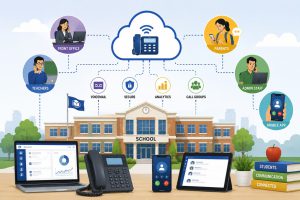

Have you ever looked at your district’s emergency plan and wondered if the phone system would keep up when minutes feel like seconds? An IP PBX solution for schools changes what happens after the first call, because it controls routing, location data, alerts, paging, and who gets reached next, across every building you manage.
Most legacy PBX setups still rely on site-by-site hardware, old extensions, and limited visibility. That works on calm days. It breaks down when a call needs the right route, the right campus, and the right on-site response at once. Schools do not need more tools. They need one communication layer that staff trust.
How an IP PBX Solution for Schools Transforms Emergency Response and Multi-Campus Connectivity
A school phone system does more than take calls. In real incidents, it becomes the first operating system for safety. When staff press a panic key, call 911, or trigger a lockdown workflow, your platform must do three jobs without delay: route, locate, and notify.
A modern district voice platform routes calls based on role and context, not just extension numbers. It maps buildings, wings, and room groups. It pushes alerts to the right people, not to everyone. It logs actions for after-incident review. It also keeps the district connected so one campus does not operate as an island while leadership scrambles across multiple channels.
In the US, emergency calling expectations also changed for multi-line phone systems. Districts now face higher pressure to deliver location details for emergency calls, and to ensure staff can reach emergency services without friction. A cloud-first IP PBX approach supports that operational goal while cutting the “who do I call” confusion that shows up in drills.
How It Brings Daily Comfort and Long-Term Value to School Districts
Emergency response drives the decision, but daily operations justify the budget. District leaders want fewer dropped calls, fewer office bottlenecks, and fewer “I called the wrong school” moments from families. They also want a clean way to manage staff moves, seasonal hiring, and campus expansion without new hardware projects.
The best hosted voice environments give schools the same three wins every week: predictable routing, consistent user experience, and central control. That is where the IP PBX solution for schools fits, because districts can standardise call flows across every site, then tune each campus where needed.
Faster Emergency Call Routing with Direct 911 and Location Accuracy
Emergency call routing becomes reliable when the system ties every device and user to a location record. That includes front offices, nurse rooms, security phones, and softphones on approved devices. When staff call 911, the system passes location data tied to the calling endpoint, so responders do not rely on a verbal description from a stressed caller.
You also want call rules that avoid dead ends. The system can send simultaneous notifications to district safety roles, campus admins, and on-site response teams. It can also route incoming emergency callbacks to staffed lines, not to an empty classroom phone after hours.
District-Wide Communication Across Multiple Campuses in Real Time
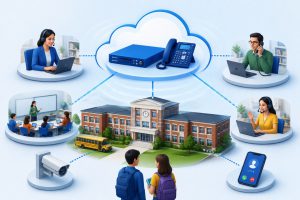
Multi-campus connectivity fails when each building uses separate routing logic, separate voicemail, and separate operator processes. Districts fix that by treating the phone system as one district network with campus-aware rules.
That structure gives you a single directory, consistent extension logic, and district-wide hunt groups. It also helps with parent communication. Families reach the right school faster when you centralize call handling and push overflow calls to trained staff rather than letting lines ring out.
On the admin side, you reduce escalations and repeat work. A district office can see status, shift calls, and support campuses during peak traffic like enrollment week, weather closures, or safety drills.
Integrated Paging, Intercom, and Alert Systems on One Network
Schools run multiple announcement channels: paging, intercom, bell schedules, and emergency alerts. When these systems sit on separate controls, staff waste time switching tools or re-entering the same message.
A unified communications approach connects voice, paging triggers, and alert workflows so staff can act from a single interface. That does not mean you rip and replace everything. Many districts integrate existing paging and intercom endpoints and then control them through the IP PBX layer. That approach protects past investment while giving you a central control plane.
The goal is simple. Staff press one action, and the system distributes the message to the right zones. You avoid building-wide noise for routine issues, and you keep full-campus alerts reserved for real emergencies.
Mobile Access for Administrators and Safety Teams
In real incidents, leaders rarely sit at desks. Principals walk campuses. Security teams move between buildings. District leaders travel. If your phone system only works at a wall phone, it limits response speed.
Mobile access matters for two reasons. First, it keeps leaders reachable through their district identity, not personal numbers. Second, it lets safety teams receive calls and alerts in the same workflow used on campus.
This is also where the IP PBX solution for schools helps remote work days. Snow days, severe weather, and short-notice closures no longer break communications. Staff can continue operations with approved softphones and role-based routing.
Reduced Downtime With Cloud Redundancy and Failover
Traditional PBX downtime often comes from single points of failure: on-site controllers, power issues, aging cards, and carrier limitations. Cloud redundancy shifts reliability to multi-region infrastructure and controlled failover logic, so a single campus outage does not take down the district’s entire voice environment.
Failover strategy also needs planning. You want defined call paths when an internet circuit drops, when a building loses power, or when a campus phone closet goes offline. The system can route calls to backup numbers, re-home key roles to mobile clients, and keep emergency calling ready with your configured policies.
Lower Infrastructure Costs with Centralized Management
Cost savings come from fewer hardware refresh cycles, fewer site visits, and fewer vendor callouts. Central management also reduces the labour cost of adds, moves, and changes, because IT updates users, extensions, and call flows through a central portal instead of on each campus.
Below is a simple comparison that district leaders often use during budgeting discussions.
| Cost Driver | Legacy On-Site PBX | Cloud IP PBX for Districts |
| Hardware refresh | Scheduled replacements per site | Reduced on-site hardware footprint |
| Maintenance | Vendor visits, parts, local troubleshooting | Central monitoring, remote changes |
| Expansion | New hardware per campus | Add users and sites through central control |
| Disaster recovery | Site-by-site planning | Central redundancy and defined failover paths |
| IT workload | More hands-on support | Fewer repetitive tasks, more policy control |
How Squibit Supports School Communication Modernization
Squibit connects to school communications because it delivers hosted IP PBX and unified communications in a cloud model built for multi-site operations. When we plan a district rollout, we start with the call paths that staff already trust, then we tighten safety routing, paging integration, and campus-level control so daily use stays simple.
K-12 schools are actively transitioning to cloud-based VoIP and unified communications solutions, including IP phones and hosted platforms.
Squibit runs as a cloud-based unified communications platform with hosted IP PBX functionality, so districts can reduce on-site PBX hardware and simplify maintenance. The system supports VoIP calling, SMS and MMS messaging, and emergency alert workflows that fit school operations.
- Cloud-native hosted PBX reduces equipment dependency and lowers local support load
- Multi-device access supports desk phones, mobile apps, and softphones for staff roles
- School-focused safety tools include E911 support, alert routing, and audit-ready call handling
- Paging and bell scheduling integration keeps announcements and timing controls aligned
- Reporting and analytics help admins track call traffic, missed calls, and routing gaps
We see districts move faster when they standardise call flows across campuses and keep campus-level controls for front office and safety teams. Squibit supports that balance without forcing separate tools for voice, alerts, and staff messaging.
Implementation Roadmap for Schools Moving from Legacy PBX to IP-Based Systems
A smooth migration starts with risk control, not feature shopping. Schools should treat this like an operational change project with IT, safety leadership, and front office owners in the same room.
Start with a call flow map for normal days and incident days. Define who answers overflow calls, who receives emergency notifications, and which numbers remain staffed after hours. Then build a location model that matches your campuses, buildings, and key rooms.
Next, confirm network readiness. Voice needs stable connectivity, QoS policy, and clean Wi-Fi coverage in admin zones where staff rely on softphones. Plan your failover policy before you cut over.
Finally, run phased adoption. Pilot one campus, fix friction, then scale. In deployments we manage, we also train office teams with live call scenarios, because front office behaviour drives system success.
Conclusion
Emergency response and multi-campus coordination demand more than a dial tone. A modern voice layer supports location-aware emergency calling, campus-wide alerts, and district routing that stays consistent across every building. If you want safer workflows and fewer communication gaps, start with an IP PBX solution for schools that fits your district structure and daily reality.
Request a Squibit demo and we will map your call flows, safety routing, and multi-campus rollout plan with you.
FAQs
1) Do schools need to replace every phone to move to cloud VoIP?
No. Many districts reuse compatible IP phones, keep some analog devices with adapters, and replace only where features or reliability require it.
2) What bandwidth does a school need for VoIP calling?
Plan for steady upstream and downstream capacity, then apply QoS so voice traffic gets priority during peak student network use.
3) How long does number porting take for a district?
Porting often takes days to weeks depending on carriers and number volume. Schools reduce risk by porting in stages with temporary routing.
4) Can an IP PBX work with classroom door phones and entry systems?
Yes. Schools integrate SIP-capable door stations and route calls to role-based groups like office staff, security, or campus admins.
5) What happens to calls if the internet goes down at one campus?
With failover rules, the system routes calls to backup numbers, other campuses, or approved mobile clients so families still reach staff.